Posts

Converting SQL query result into JSON string

Image
SQL doesn't provide native support to translate query result into JSON format. But we can achive this with a little twisting with SQL :). Assume we have a "Computer" table in database with the following data: Now, we can get this data into JSON format using the query below: Here, I've used UNPIVOT operation to de-normalized the data and then constructed the JSON string. Notice that: the ProductCode has been used as the primary key of the objects in this query. You can also achive the same thing without using UNPIVOT; but in that case you have to construct the JSON string for every column you need by yourself. And if you are looking for more generic one to convert each row from a data set regardless of any primary key or without knowing the exact columns to be converted, following stored procedure could be helpful: I hope this will be helpful to someone looking for generating JSON feed directly from SQL. Cheers!
Push notification with SignalR across session state

Using SignalR is pretty simple for implemeting push notification service. One thing to keep in mind is:  SignalR connections (including the connection underlying all Hub operations for a client) do not support Session state. So it's not possible to access session data from signalr hub. Now let's assume one scenario, where we need to perform a database operation on postback ( e.g. post action in an mvc controller ) based on a user action and after that we need to redirect to a listing/default page. But we want to let user know if the operation succeeded or not. Here is a Hub implemented to send client notification: Here is how it is initialized: And here is the client side script: The final thing is to invoke the client side  showNotification() function when the redirected view page is loaded. But problem is: the calling page and the redirected page are two different views and the session state is changed in the meantime. After redirection client hub in...

Adding dymanic filters in reports with SSRS

Image
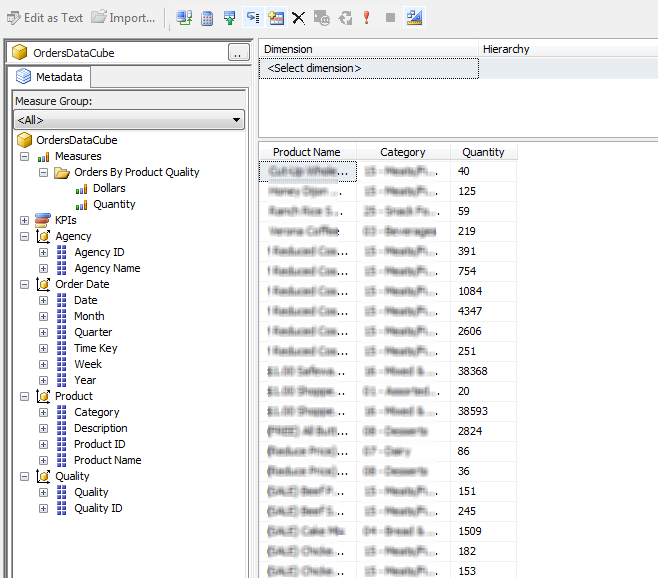
SSRS report paramters doesn't support runtime selection of operations by default. For example: we want to let users filter data by checking any criteria that equals, not equals or contains any specified value. W e can achieve this by using ssrs expressions. Below is outlined a step-by-step guide to do this. Following is a snapshot of a simple cube to be used in this example: The cube contains orders data including two measures: quantity of products and dollars of orders. It has four dimensions, but for this example lets focus on the Product and Quality dimensions only. The aim is to create a report to view total dollars received from the orders per product quality for specific product categories . Before starting we need to create the reporting project using SSRS and then add the data cube as a shared datasource. I've also added a dataset using query designer. It includes Dollars as measures and Product Name, Category, Quality to group the measure va...

Executing synchronous methods asynchronously

We can achieve certain advantages by writing asynchronous methods. It's pretty simple to write them in C# code: we just need to use  async  and  await keywords properly. Grammar of these keywords can be found in detail in MSDN . In this post I will try to focus on writing few code to invoke a regular synchronous method asynchronously. Let's assume a scenario where we need to perform an expensive database operation when a particular information is changed from the front end. For example: I have an application to manage employee information and I've changed the basic salary for a particular grade using my application. Now I need to update salary of all the employees under that grade. The later operation will be slower one and I don't want this to block me from doing other stuffs. Here is a piece of synchronous code to update salary information: public   bool   UpdateEmployeeSalary ( string   grade ) {      try  ...

Different approaches for paging SQL data

Image
Pagination is a common technique to improve user experience while pulling large chunk of data from SQL. But even pulling paged data could become an overhead while  retrieving  data across multiple tables. Here I will go through some of the techniques for pagination. For illustration I am assuming there is an "Activities" table that holds logs for all activities throughout an application. I will be retriving paged data from this table. Approach 1: using ROW_NUMBER This is the most common approach for getting paged data from SQL query and it works pretty well for simple queries. Here is an example: DECLARE   @StartIndex   INT ,   @EndIndex   INT ; SET   @StartIndex   =   51 SET   @EndIndex   =   100   SELECT   *   FROM   (   SELECT   Count ( 1 )   OVER  ()   AS   TotalCount ,          ROW_NUMBER ()   OVER ...